
Payment Instrument Tokenization (Checkout)
How it works
In the hosted Checkout flow you make one API call — creating the payment intent. Everything else happens on the hosted form:
| Step | Description |
|---|---|
| 1 | You create a PaymentIntent and receive a checkout link. |
| 2 | You redirect the shopper to that link. |
| 3 | On the form the shopper saves a card, reuses a saved one, or removes one — no extra API calls from your side. |
| 4 | You receive the result on your webhook. |
The shopper experience
Saving, selecting and removing cards all happen on the hosted checkout. Below is what the shopper sees and can do.
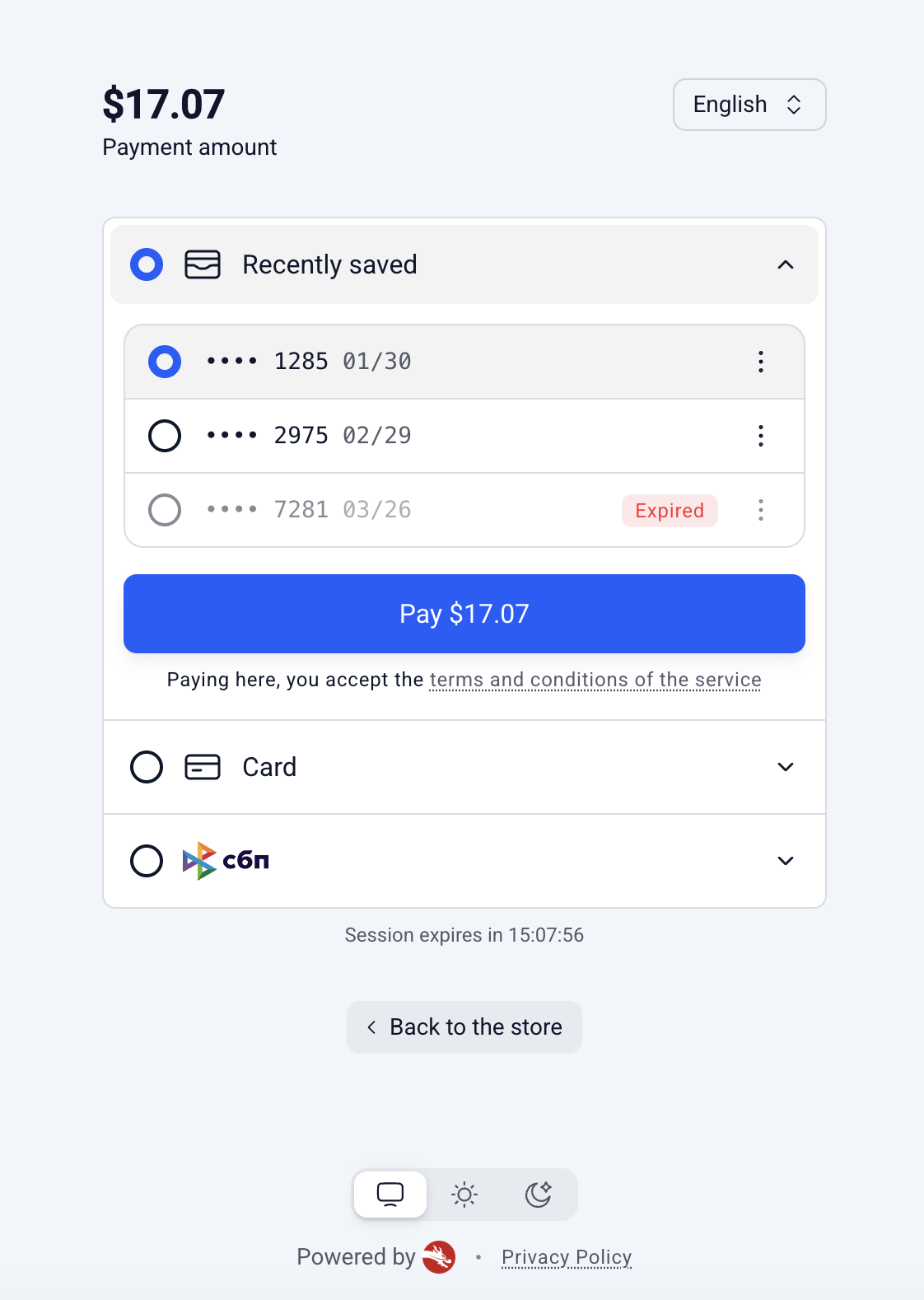
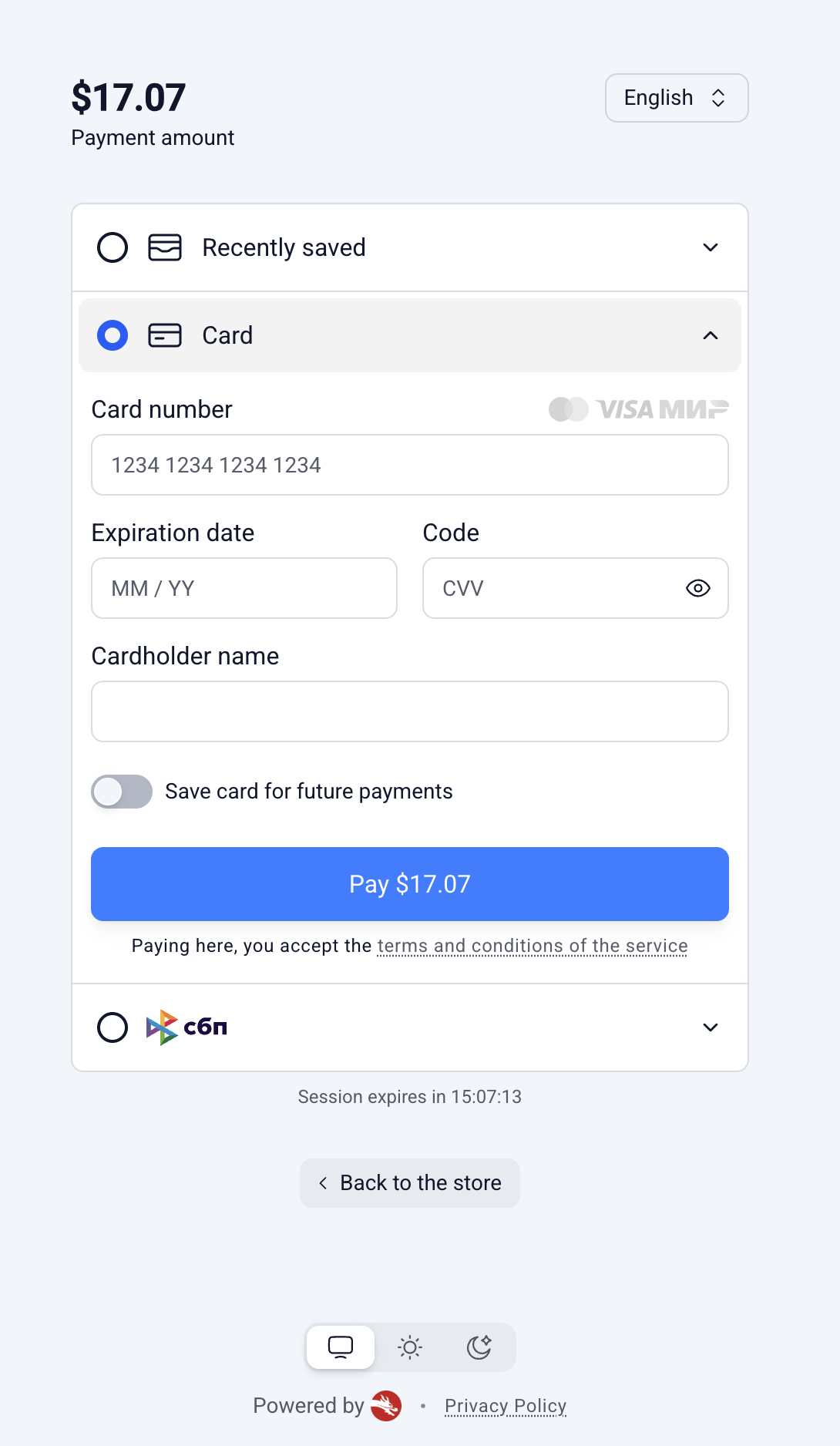
List of Scenarios
| Scenario | Description |
|---|---|
| Saving a new card |
|
| Viewing saved cards |
|
| Paying with a saved card |
|
| Removing a saved card |
|
Consent
- A card is stored only with the shopper's explicit consent, given by ticking the save option on the form.
- Without that consent, no card details are retained.
Limit on saved cards
- By default, a shopper can save up to 5 cards per payment method.
- Your integration manager can adjust this limit.
- Once the limit is reached, the shopper must remove an existing card before a new one can be saved.
- Reaching the limit never blocks payment: the shopper can still pay with a new card — it is simply charged without being saved.
Unavailable cards
- A saved card can become unusable if the issuing bank reports it as invalid — for example, the card was lost, blocked, or has expired.
- Such a card is not removed automatically.
- It stays visible in the shopper's list, clearly marked as unavailable: the shopper cannot pay with it, but can delete it — which also frees up a slot for a new card.
Enabling saved cards
You are fully responsible for passing the correctmerchantPayerReference.Cards are shown to whoever the intent says the payer is. If you send a value that belongs to a different user (a wrong or mixed-up id), that user's saved cards will be exposed to the current shopper. Make sure the reference always matches the authenticated user in your system.
Two things are required for a shopper to see and reuse their saved cards:
1. Feature enabled on the form template.
- Card saving is configured per merchant and is off by default.
- Ask your integration manager to enable it and to set the limit of saved cards per payment method.
2. Identify the shopper in the intent.
- Saved cards are tied to
(your account + payer.merchantPayerReference). - Pass a stable
merchantPayerReference(the shopper's id in your system) when creating the intent. - Use the same value on future intents and the shopper's saved cards appear automatically.
- If you omit it, nothing can be saved or reused.
Without
merchantPayerReference, the "Save card" option still shows and the payment goes through — but the tick is silently ignored and nothing is stored. Always send a stable reference to actually save cards.
Create the intent
Full list of parametersThe full list of parameters is available on the page: "Card" Payment Method
POST https://sandbox.8b.world/processing/api/v1/intentscurl --request POST \
--url 'https://sandbox.8b.world/processing/api/v1/intents' \
--header 'content-type: application/json' \
--header 'X-API-Key: <token>' \
--data '{
"clientReferenceId": "order_12345",
"useCheckoutForm": true,
"paymentIntent": {
"submittedAmount": { "value": 17.07, "currency": "USD" },
"description": "Order #12345",
"webhookUrl": "https://merchant.com/webhook",
"payer": {
"merchantPayerReference": "CUST_12345",
"email": "[email protected]"
},
"formDetails": {
"template": "checkout-light",
"displayedPaymentMethods": ["CARD", "SBP"],
"backToStoreRedirectUrl": "https://merchant.com/checkout"
}
}
}'Key fields
| Field | Required | Purpose |
|---|---|---|
useCheckoutForm | yes | Must be true for hosted Checkout. |
paymentIntent.payer.merchantPayerReference | for tokenization | Stable shopper id in your system — the key that links saved cards to the shopper. |
Response — the intent contains the checkout session id and the hosted link to open:
{
  "intentId": "...",
  "paymentIntent": {
    "intentSessionId": "is_01JVM1PZ0J7B1Y9J6R3X2M8KQF",
    "additionalData": {
      "url": "https://checkout.8b.world/is_01JVM1PZ0J7B1Y9J6R3X2M8KQF"
    }
  }
}
Redirect the shopper to paymentIntent.additionalData.url.
Webhook
Full list of parametersThe full list of parameters is available on the page: Webhooks: Example
When the payment finishes, we call your webhookUrl. The two fields relevant to card-on-file are isStoredCredential and last4, delivered alongside the standard payment fields.
Example of a successful card payment made with a saved card:
{
  ...
  "isStoredCredential": true,
  "last4": "4242",
  ...
}
Fields
| Field | Meaning |
|---|---|
isStoredCredential | true if the payment was made with a previously saved card. |
last4 | Last 4 digits of the card used. Returned on any card payment whenever we have the card data — both successful and declined — not only for saved cards. |
Note on what the webhook tells you: isStoredCredential signals only that the payment was made using a saved card. There is no separate "a new card was just saved" flag, and the card token (pi_) is not returned. If you need to know a card was newly stored, that state is not delivered via the webhook today.
Updated about 1 month ago